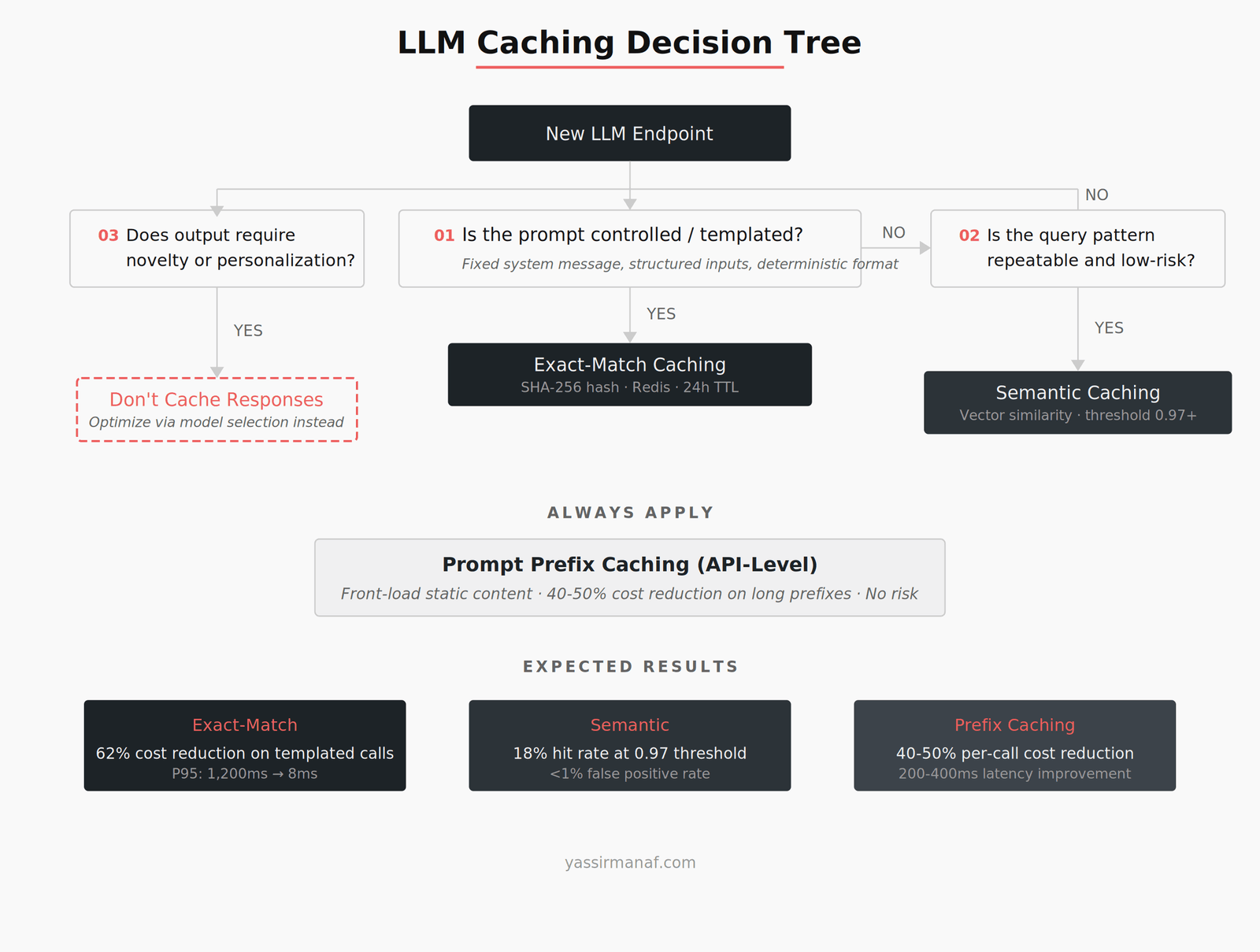
Every LLM call costs money and adds latency. The first time I watched our Azure OpenAI bill climb past $4,000 in a single month on a system that was sending the same dozen prompt patterns repeatedly, I knew we had a caching problem. Not a “nice to have” optimization — a structural gap in our architecture.
LLM caching production is not the same problem as caching a REST API response. The inputs are fuzzy. The outputs are non-deterministic. The contexts shift. Most caching strategies that work perfectly for traditional APIs break down the moment you try to apply them to language model inference.
This article is about the caching layer I built, the decisions that shaped it, and the traps I walked into along the way.
Why traditional caching doesn’t work for LLM responses
Standard API caching relies on a simple contract: same input, same output. Hash the request, store the response, serve it next time. Redis, Memcached, CDN — the tooling is mature and the mental model is straightforward.
LLM calls violate that contract in three ways.
First, inputs that mean the same thing look completely different as strings. “Summarize this contract” and “Give me a summary of the following contract” are semantically identical but produce different cache keys under exact-match hashing. In a traditional API, the request schema enforces consistency. In an LLM system, the input is natural language — messy, variable, and never the same twice even when the intent is identical.
Second, LLM outputs are non-deterministic by design. The same prompt with temperature > 0 produces different completions on every call. You can pin temperature to 0, but that changes the output characteristics in ways that might not suit your use case. Caching assumes reproducibility. LLMs offer probability distributions.
Third, context matters far more than the immediate query. A prompt that includes a 4,000-token document produces a different response than the same question with a 2,000-token excerpt. The cache key isn’t just the user’s question — it’s the entire assembled prompt, which might be 8,000 tokens of system instructions, retrieved context, and conversation history. Hashing all of that is possible but creates a cache that almost never hits.
I wrote about this broader challenge of managing LLM behavior in production when I first started running models at scale. Caching was one of the problems I underestimated most.
Exact-match caching: when it actually works
Despite the problems above, exact-match caching has a real place in LLM production systems. The key is knowing where it applies.
In our system, roughly 30% of LLM calls fell into a pattern I call “templated inference” — structured prompts where the system message is fixed, the user input comes from a controlled set, and the output format is deterministic (JSON, classification labels, structured extraction). For these calls, exact-match caching worked perfectly.
The implementation was straightforward. We hashed the full prompt (system message + user content + model parameters) using SHA-256, stored the response in Azure Cache for Redis with a configurable TTL, and served cached responses on key match. No semantic similarity. No embeddings. Just string hashing.
The results shifted our cost trajectory immediately. Our Azure OpenAI spend on those templated calls dropped 62% in the first month. P95 latency for cached responses went from 1,200ms (model inference) to 8ms (Redis lookup). For a system handling classification and extraction tasks, that’s the difference between a UI that feels sluggish and one that feels instant.
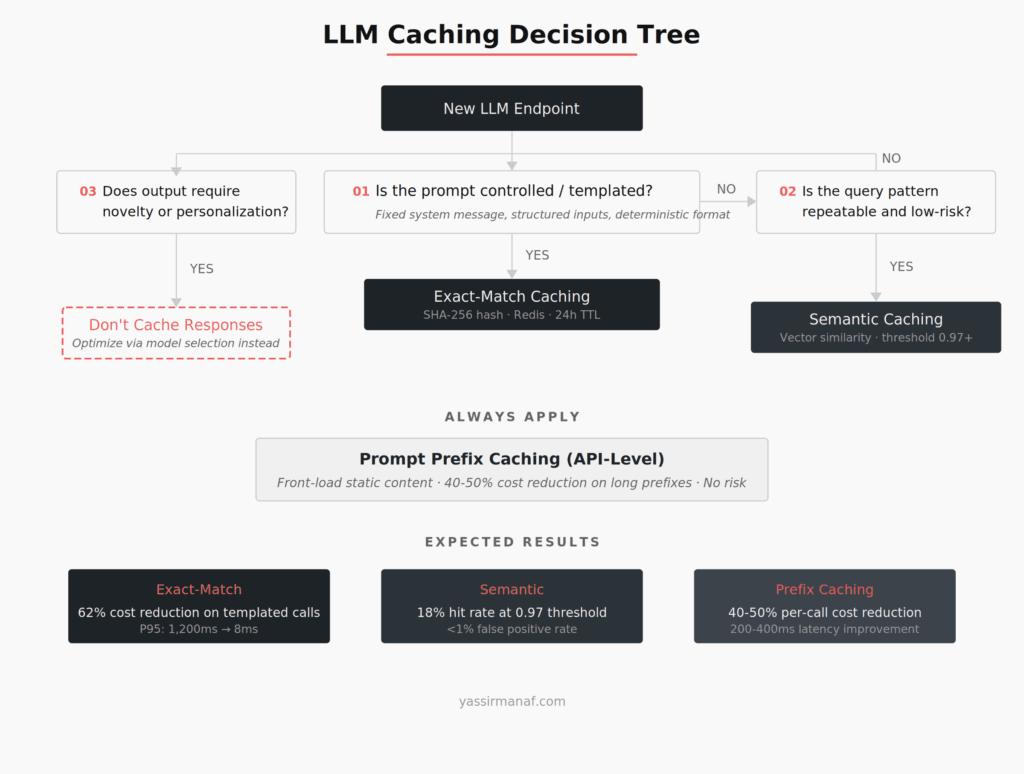
The tradeoff: exact-match caching only helps when prompts are highly repeatable. For anything involving user-generated natural language input, the hit rate was below 3%. That’s where semantic caching enters the picture.
Semantic caching: powerful but dangerous
Semantic caching replaces string matching with vector similarity. Instead of hashing the prompt, you generate an embedding of the query, search a vector store for similar past queries, and return the cached response if the similarity score exceeds a threshold.
I tested this approach using Azure Cognitive Search with vector indexing. The concept is appealing — finally, “summarize this contract” and “give me a summary of the contract” hit the same cache entry.
It worked. Sort of.
At a similarity threshold of 0.95, the hit rate was promising — around 40% of user queries matched a cached response. But the false positive rate was the problem. At 0.95 similarity, roughly 8% of cache hits returned responses that were wrong for the specific query. Not subtly wrong. Wrong in ways that eroded user trust immediately.
The issue is that semantic similarity doesn’t capture intent precision. “What are the payment terms in this contract?” and “What are the termination terms in this contract?” have high cosine similarity. They’re asking fundamentally different questions. A semantic cache doesn’t know the difference unless you tune the threshold so aggressively that the hit rate drops to near zero.
We settled on a hybrid: semantic caching only for queries where a wrong cached response was low-risk (general summaries, FAQ-style questions), with a threshold of 0.97. For anything involving specific data extraction or decision-support outputs, we fell back to exact-match or no caching at all. The hit rate on semantic cache was modest — around 18% — but the error rate dropped below 1%.
If you’re using a vector database in production for RAG, you already have the infrastructure for semantic caching. The temptation is to cache aggressively. Resist it.
Prompt prefix caching: the platform-level optimization
Both OpenAI and Anthropic now offer prompt prefix caching at the API level. This is a different kind of caching — the platform caches the KV computations for the static prefix of your prompt (system message, few-shot examples, long context documents) and only runs inference on the new, variable suffix.
This matters because most production prompts have a large fixed prefix. A typical prompt in our system was 3,500 tokens of system instructions and few-shot examples, followed by 200-500 tokens of user-specific content. Without prefix caching, the model reprocesses those 3,500 tokens on every call. With it, only the variable suffix requires fresh computation.
The cost impact was significant. Anthropic’s prefix caching reduced per-call cost on our longest prompts by roughly 40-50% — the cached prefix tokens are billed at a fraction of the standard input rate. Latency improved by 200-400ms on prompts with long system contexts.
The constraint: prefix caching only works when the beginning of the prompt is identical across calls. If you’re dynamically constructing prompts where retrieved context appears before the user query, the prefix changes on every call and the cache misses. Prompt structure matters. We restructured our prompts to front-load the static system message and few-shot examples, pushing all variable content (retrieved documents, user input) to the end.
This is an architectural decision that most teams miss. Prompt prefix caching is free performance — but only if your prompt engineering process accounts for it from the start.
When caching hurts: three patterns to avoid
Caching LLM responses creates real risks when applied in the wrong context. I learned each of these the hard way.
Stale responses on evolving data. We cached responses for a document Q&A system where the underlying documents were updated weekly. Users asked questions, got cached answers based on last week’s document version, and reported the system as inaccurate. The cache didn’t know the source data had changed. We added a cache invalidation layer keyed to document version hashes — but that complexity almost negated the caching benefit. For systems where source data changes frequently, short TTLs or version-aware cache keys are mandatory. Long TTLs on dynamic data will burn you.
Personalized responses served from a shared cache. A classification endpoint that factored in user-specific context was briefly cached without including the user context in the cache key. Two different users with different permission levels got the same cached response. The fix was obvious in retrospect — include all context-dependent variables in the key — but the initial implementation treated the cache as prompt-only.
Creative and generative use cases. Caching a creative writing assistant defeats the purpose. Users expect variety. Serving the same story opening twice signals that the system is broken, not fast. For any use case where novelty is part of the value, caching is the wrong optimization. Reduce cost through model selection or prompt compression instead.
LLM caching production patterns in .NET and Azure
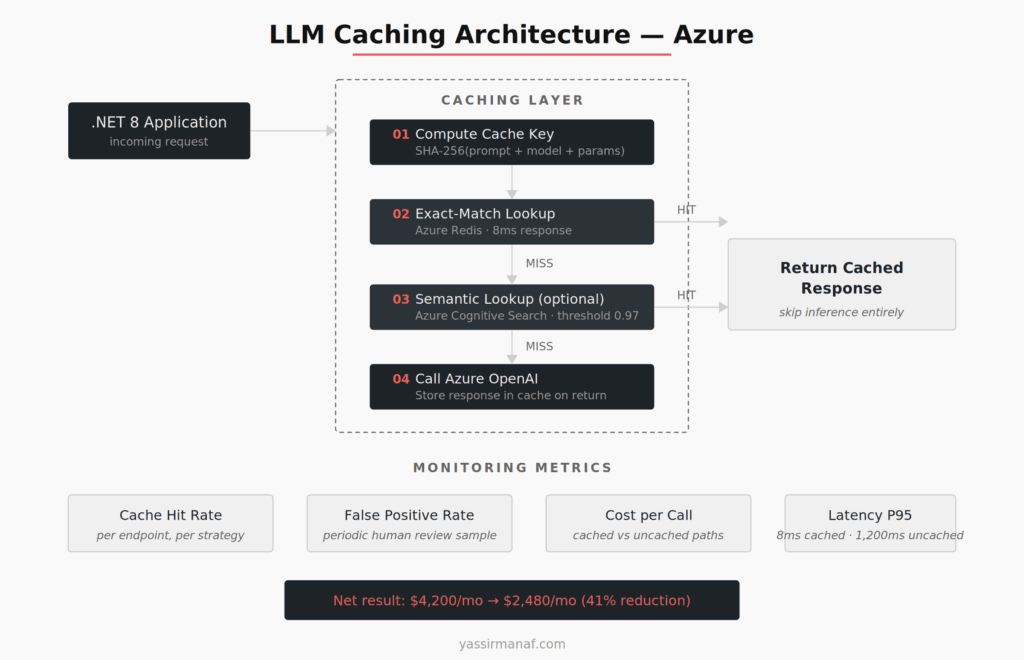
Here’s the pattern we run in production on .NET 8 with Azure services.
The caching layer sits between the application and the LLM client as a delegating handler. Every outbound LLM call passes through it. The handler computes the cache key (SHA-256 of the full serialized prompt for exact-match, or generates an embedding for semantic lookup), checks Azure Cache for Redis, and either returns the cached response or forwards the call to Azure OpenAI.
For exact-match: Redis with a 24-hour TTL for templated prompts, 1-hour TTL for anything with user-generated content. Keys include the model name and temperature setting — a response from GPT-4 shouldn’t serve a request intended for GPT-3.5.
For semantic: Azure Cognitive Search vector index storing past query embeddings alongside their responses. Similarity threshold of 0.97. The embedding call adds ~50ms of latency to every cache miss, which is acceptable against the 800-1,500ms saved on a cache hit. We only enable semantic caching on endpoints where the risk profile justifies it.
Cache invalidation follows two strategies. Time-based TTL handles staleness for most cases. For document-dependent responses, we hash the source document and include that hash in the cache key — when the document changes, the old cache entries simply stop matching.
Monitoring is critical. We track cache hit rate, false positive rate (via periodic human review of a sample of cached responses), cost per call with and without cache, and latency distributions for cached vs. uncached paths. Without these metrics, you’re flying blind. I wrote about the broader observability infrastructure that makes this kind of monitoring possible.
The total Azure cost reduction from our caching layer across all endpoints: 41% reduction in monthly LLM spend, from $4,200 to $2,480. The caching infrastructure itself (Redis instance + embedding calls for semantic cache) added $180/month. Net savings: $1,540/month.
The caching hierarchy I’d recommend
After running this system for several months, here’s the order I’d evaluate caching strategies for any new LLM endpoint:
Start with prompt prefix caching at the API level. It’s free to implement, requires only prompt restructuring, and reduces cost on every call regardless of whether the full response is cacheable. There’s no downside.
Next, identify templated inference calls and apply exact-match caching. Classification, extraction, structured output — anything where the prompt is controlled and the output is deterministic. This is your highest-ROI cache layer.
Then evaluate semantic caching for high-volume, low-risk query patterns. FAQ-style questions, general summaries, repeated informational queries. Set the similarity threshold high (0.97+) and monitor false positives relentlessly. The cost of a wrong cached response is always higher than the cost of an extra LLM call.
For everything else — personalized outputs, creative generation, decision-support with changing context — don’t cache the response. Optimize cost through model selection, prompt compression, or batching instead.
The mistake I see most teams make is treating LLM caching as a single strategy. It’s not. It’s a hierarchy of techniques, each with different tradeoff profiles, applied selectively based on the characteristics of each endpoint.
Cache what’s repeatable. Recompute what’s not. Measure everything.
Running LLM inference at scale and fighting the cost curve? I’d like to hear what’s working for you. Find me on LinkedIn.
Leave a Reply