![llm-latency-production.png] Alt text: LLM in production latency comparison chart showing p50, p90, and p95 response times for GPT-3.5 and GPT-4](https://yassirmanaf.com/wp-content/uploads/2026/04/llm-latency-production.png)
The first time I shipped an LLM in production, I thought I’d done the hard part. The demo worked. The prompts looked clean. The API was responding in under two seconds on my machine. Six weeks in, I was diagnosing a production incident caused by a prompt I hadn’t touched in three weeks.
Running an LLM in production is a different problem than building with one. The demo environment hides almost everything that matters operationally. This article covers what actually surprised me during the first two months of that first deployment — latency distributions I hadn’t modeled, cost overruns I hadn’t anticipated, prompt drift I didn’t know was possible, and outputs that broke my parsers in ways I hadn’t designed for.
GPT-3.5 and GPT-4 era. No RAG, no agents, no fine-tuning. A single inference endpoint and a system that needed to be reliable. These are the things I’d tell myself before shipping it.
The Latency Reality of Running an LLM in Production
My local benchmarks showed average response times of 1.8 seconds for GPT-3.5-turbo and 4-5 seconds for GPT-4. Both felt acceptable. Both were misleading.
Production latency is not your average. It’s your 95th percentile. A user hitting a 14-second response at p95 doesn’t care that your median was under 2 seconds. They’ve clicked away or assumed the app is broken.
The first metric I added was percentile tracking — p50, p90, p95. Not just average response time. Once I had that data, GPT-4’s p95 in production was regularly hitting 18 to 22 seconds during high-load periods on OpenAI’s infrastructure. That’s not an acceptable user experience. That’s a stalled loading screen.
![llm-latency-production.png] Alt text: LLM in production latency comparison chart showing p50, p90, and p95 response times for GPT-3.5 and GPT-4](https://yassirmanaf.com/wp-content/uploads/2026/04/llm-latency-production-1024x524.png)
Three changes made the most difference:
Stream the response. Token streaming changed the perceived experience immediately. Total latency was identical, but users saw words appearing within a second of their request. Tolerance for slow streaming is significantly higher than tolerance for a blank screen followed by a complete answer appearing all at once.
Set hard timeouts. My initial implementation had no timeout at all. Failed requests were hanging silently in the background, accumulating. A 15-second hard timeout with a user-facing fallback message surfaced how often the API was actually stalling — something I hadn’t known was happening.
Move more calls to GPT-3.5. GPT-4 is genuinely better at complex reasoning. It is not meaningfully better for most of what I was using it for. After benchmarking actual output quality per use case against 150 real examples from my logs, I moved 70% of my calls to GPT-3.5-turbo. Latency at p95 dropped from 22 seconds to 6 seconds for those calls. Cost dropped proportionally.
The lesson: measure your real latency distribution before you decide which model to use. Average response time tells you almost nothing useful for UX decisions.
Prompts Break in Production Without Warning
I had a prompt that worked cleanly in testing. Consistent format, right tone, predictable length. I deployed it and didn’t touch it for three weeks.
Then outputs started drifting. Not wrong, exactly — just off. The tone shifted slightly. Format wasn’t consistent between calls. One response included a section header I hadn’t asked for. Another came back twice as long as expected.
I hadn’t changed anything. OpenAI had rolled a model update.
Prompt behavior is not stable across model versions. What works against gpt-3.5-turbo today may produce different outputs next month if OpenAI updates the weights behind the same model identifier. This is documented behavior. It doesn’t sink in until you’ve watched your outputs drift in production.
I pinned to a specific dated snapshot: gpt-3.5-turbo-0125 instead of gpt-3.5-turbo. That stopped the model-side drift. I also added an output validation layer — not complex, just checking that responses met a minimum set of structural expectations before reaching users. When a response failed, I logged it and served a fallback.
Prompt brittleness also comes from user inputs you didn’t anticipate. In testing, inputs are controlled. In production, users send one-word queries, questions in unexpected languages, and strings that are literally just “test” or a string of question marks. Each one hits your prompt with context you didn’t design for.
I added prompt-level input guards: length checks, basic normalization, and a simple classifier that flagged inputs likely to produce garbage outputs. None of it was sophisticated. All of it helped.
The other variable I hadn’t thought carefully about: temperature. I was using the default of 1.0. That’s fine for creative tasks. For anything where consistency matters — formatting, tone, structural output — it’s too high. Dropping temperature to 0.2 for structured tasks meaningfully reduced format variance in my outputs. It’s a one-line change with a noticeable effect.
The Real Cost of an LLM API Call
I estimated roughly $0.002 per GPT-3.5 call and around $0.04 per GPT-4 call before launch. The per-call math felt manageable. Then I looked at the actual bill at the end of the first month.
The issue wasn’t the per-call price. It was everything I hadn’t accounted for.
My system prompt was 847 tokens. Every single call included those 847 tokens — whether the user asked a simple yes/no question or a multi-step complex request. At the call volumes I was seeing, that system prompt was responsible for 43% of my total token spend. I was paying a fixed overhead tax on every request without realizing it.
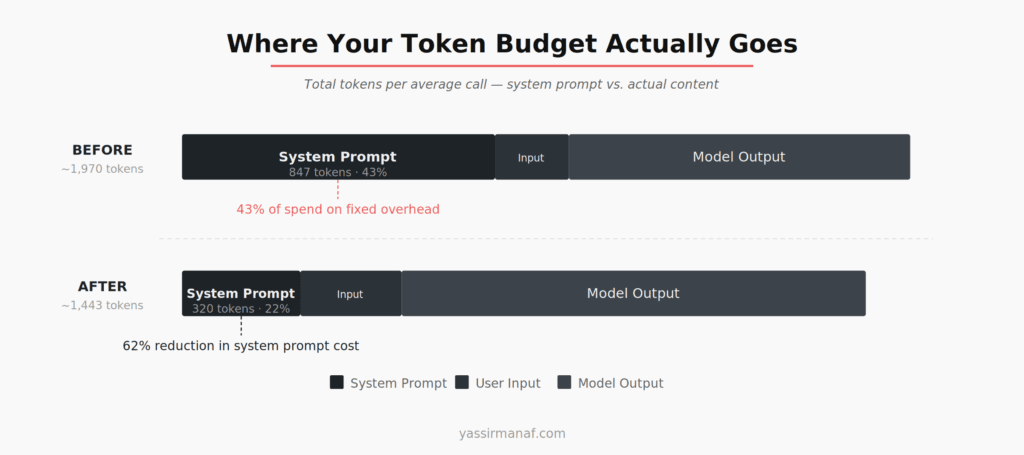
I audited the system prompt and removed everything I couldn’t trace to a measurable output improvement. Cut it from 847 tokens to 320. I ran the trimmed prompt against 200 real user inputs from my logs and saw no meaningful quality difference on any of them. That’s a 62% reduction in base token cost per call. One afternoon of work.
Two other things I missed in my initial cost model:
Retry costs. A failed call that retries twice costs three times what you expected. My error rate in the first week was around 3% — sounds small, adds up. I started tracking retry counts per call from week two onward.
Caching. Some inputs were functionally identical — same question, slightly different phrasing. A lightweight caching layer based on a normalized input hash, with a short TTL for time-sensitive outputs and no TTL for deterministic ones, reduced redundant API calls by 12-15% in the first week.
Neither of these is a complex optimization. They’re just things you miss when you’re focused on getting the demo working.
One more cost control I added late but should have had from the start: max_tokens caps per request type. Without a cap, a model can return arbitrarily long responses. I had one call type where the model occasionally returned 1,800 tokens when 200 was appropriate. I wasn’t even displaying most of the output — I was just paying for tokens I discarded. Setting a tight max_tokens value per use case cut tail-end token waste by around 20%.
LLM Output Is Not Structured. Plan for That.
This cost me more debugging time than anything else in the first two months: I assumed I could parse LLM outputs programmatically with reasonable reliability.
I asked for a list. I got “Here is the list you requested:” followed by the list — sometimes bulleted, sometimes numbered, sometimes neither. I asked for a score from 1 to 10. I got “The score is approximately 7-8, depending on how you weigh the factors.” I asked for a JSON object. I got the JSON object preceded by a sentence explaining what it contained.
Structured output support didn’t exist yet. I was working with raw completion text and hoping the prompt was specific enough to enforce format.
It wasn’t.
What actually helped: specify format with a literal example, not a description. “Return a JSON object with a score field” does not work reliably. “Return exactly this format, with no other text: {"score": 7, "reason": "..."} ” worked significantly better. Format failure rate dropped by roughly 70%.
I also wrote format extractors that could recover structured data from loosely-formatted text. If the model returned “Score: 7” instead of {"score": 7}, the extractor could still parse the value. Fragile? Yes. Better than hard-failing on every format deviation? Also yes.
One rule I settled on early and never broke: never route LLM output directly into a database write or a downstream API call without validation. The model will eventually return something your code doesn’t expect. Not a question of if. Design for that case from the start.
Non-determinism also meant I couldn’t test LLM behavior the way I tested normal code. Identical inputs sometimes produced slightly different outputs. I moved to property-based testing — checking structural properties of outputs rather than exact values — and maintained a curated regression set of 40 real examples I could run against any prompt change before deploying.
What You Need in Place Before Running LLM in Production
The things that made the biggest operational difference weren’t prompt engineering techniques. Boring infrastructure decisions.
Log every call. Not just errors — every prompt, response, token count, latency number, and model version. I stored these with timestamps from week two onward. That data was essential for diagnosing the drift issue, understanding my cost breakdown, and spotting where the model was consistently failing.
Add a circuit breaker. OpenAI’s API goes down. When it does, your app needs to degrade gracefully rather than cascade into unhandled errors. I added a circuit breaker — based on the pattern Martin Fowler documents well — that switched to a static fallback after five consecutive failures. Not elegant. Users saw a message instead of a crash.
Set up alerting before you need it. I had logging. I didn’t have alerting. I found out about the prompt drift issue when a user reported it, not because a dashboard caught it. Latency and error rate alerts should be day one, not a week-two addition.
Treat the LLM as an external dependency with unpredictable behavior. Not like a database call. Not like a deterministic function. More like an external service that occasionally misunderstands the request — competent on average, but requiring validation on anything downstream. That framing changes how you think about error handling and observability from the start.
It’s the same instinct that drives decisions about keeping systems simple enough to actually operate under pressure — every integration point you add without observability is a liability waiting to surface at the wrong moment.
An LLM in production is achievable. The gap between a working demo and a reliable system is real, but it’s not mysterious. Timeouts. Logging. Cost tracking. Output validation. The unglamorous infrastructure that makes everything else run. Get that in place first. Optimize the prompts second.
Shipping your first LLM integration? Find me on LinkedIn.
Leave a Reply