The first time I profiled a .NET application and saw Entity Framework generating 312 SQL queries for a single reporting endpoint, I blamed myself. Wrong .Include() calls, lazy loading where it shouldn’t be — my fault, easy fix. By the fifth time, on a different project with a different team, I started asking a different question.
The question wasn’t “how do I fix the ORM?” It was: “why am I always in this position?”
ORM vs raw SQL production is a decision most .NET teams don’t make deliberately. They adopt Entity Framework at project start — because it’s the obvious default, because it’s what the template uses, because everyone on the team knows it — and then spend the next two years managing the consequences. This article is about those consequences. When the abstraction breaks down, what I reach for instead, and why the ORM vs raw SQL production debate is really a question about how much visibility you want into what your application is actually doing.
The N+1 Problem in Production Doesn’t Look Like the Textbook Version
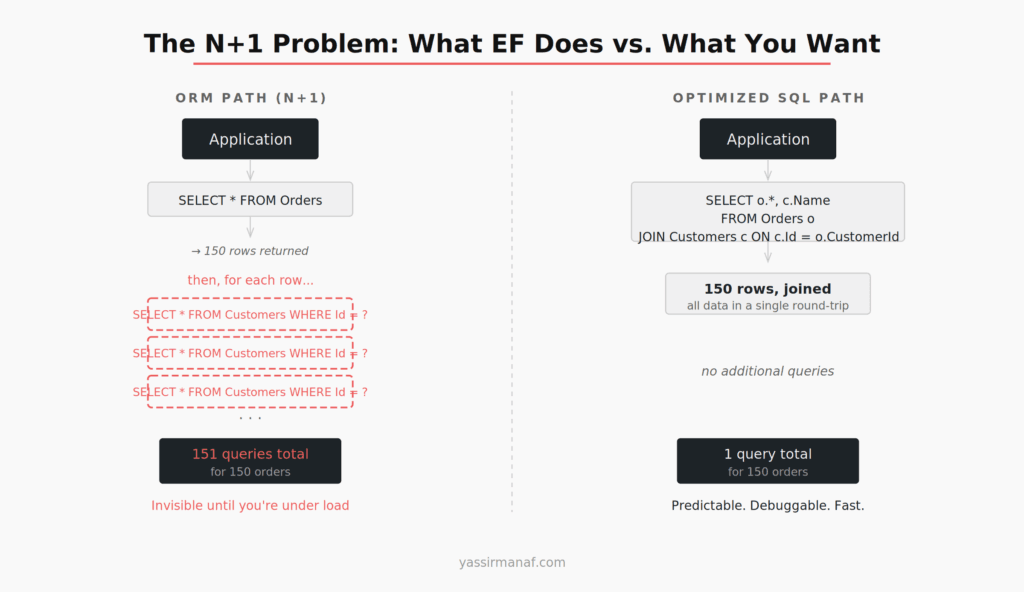
Every developer learns about N+1 queries. Load a list, iterate, access a navigation property inside the loop — you get one query for the list and one query per row for the related entity. Classic. Add .Include(), problem solved.
In production, N+1 doesn’t look like that.
It looks like a LINQ expression written eight months ago by someone who left the company, buried inside a service method called from four different endpoints. The .Include() calls are there. But someone added a new navigation property last sprint. It’s lazy-loaded by default. There’s now a second N+1 hidden inside what looked like a fixed query. Nobody noticed because the dataset in staging has 20 rows.
I spent four hours debugging a reporting endpoint at a financial services company that was timing out under moderate load. The code looked fine. The query looked fine when you read the LINQ. It was not fine — EF was issuing 312 queries against a 150-row dataset because two levels of navigation properties were being accessed in a foreach block nobody had touched in months.
The fix was a single SQL query with two JOINs. Took twenty minutes to write. The four hours were spent finding the problem.
The deeper issue: the N+1 was invisible until the dataset grew. In development, 10 rows. In staging, 20 rows. In production, 150 rows and a user waiting 40 seconds for a page to load. ORMs don’t warn you. The abstraction hides the query count until it doesn’t. This is the core ORM vs raw SQL production tradeoff that doesn’t get talked about enough: the ORM optimizes for the happy path, not for when load arrives.
You Don’t Control the SQL Entity Framework Generates
This is the part that takes longest to internalize. When you write LINQ, you’re writing a description of what you want. EF translates it. The translation is usually acceptable. Not always.
I’ve seen Entity Framework generate:
- Subqueries where a JOIN was faster and the optimizer couldn’t swap them
SELECT *on tables with 40+ columns when the query only needed four- Cartesian products from applying
.Include()to multiple collection navigations simultaneously — a known EF behavior that produces dramatically more rows than expected - Query structures that SQL Server couldn’t parallelize, adding 600ms to a query that ran in 80ms on a test set
None of these are hypothetical. All of them showed up in production on real systems.
The problem isn’t that EF generates bad SQL. Most of the time it doesn’t. The problem is that the generated SQL is invisible by default. Engineers write LINQ, the unit tests pass, the feature ships. The performance cliff shows up three weeks later when there’s real data volume and real concurrent users.
If you’re not logging all EF-generated queries in staging — with realistic data volume — you’re flying blind on every query you haven’t manually profiled. Most teams aren’t doing this. I wasn’t, early on. The performance cliff shows up in production and you’re reading generated SQL for the first time under pressure, at the worst possible moment.
Migration Drift Is Quiet and It Will Bite You
EF migrations are sold as a solution to schema management. They are a solution. They also introduce a specific class of failure: the schema EF thinks exists versus what’s actually in the database.
The divergence accumulates in predictable ways. A DBA applies a hotfix directly to production. Someone runs a migration manually on one environment and skips the others. A migration fails midway, leaving the database in a partial state. Two developers work on different branches, both add columns, the migration files conflict on merge and somebody accepts the wrong version. The EF model gets updated but the migration file doesn’t.
Every one of those has happened on a project I’ve worked on.
On an application I inherited at a development bank, the EF migrations had diverged from the production schema by fourteen changes. The application was running without errors — EF wasn’t validating the schema at startup — but every new migration was being applied on top of incorrect assumptions about the existing state. We spent two days reconciling it before we could safely add a new column to a core table.
The remediation was: audit the production schema against the EF model manually, generate a “correction” migration, apply it, then establish a rule that migrations never auto-apply in production. They run explicitly, with a reviewed SQL script alongside.
That’s a reasonable process. It’s also most of the benefit of managing SQL directly — and it’s worth noticing that the discipline required to run migrations safely is almost identical to the discipline required to just write and review SQL scripts from the start.
When ORM vs Raw SQL in Production Has a Clear Answer
This is not an argument for writing raw SQL everywhere. That would trade one class of problems for another — more verbose, harder to refactor, no change tracking. The argument is for making the choice deliberately, per query, rather than defaulting to EF for everything and patching the consequences later.
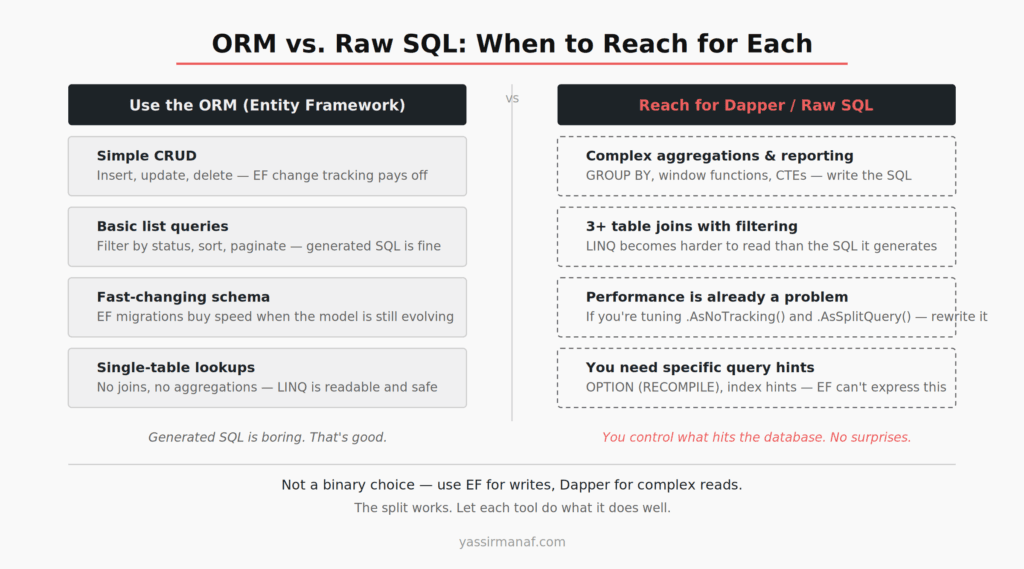
Use Entity Framework for:
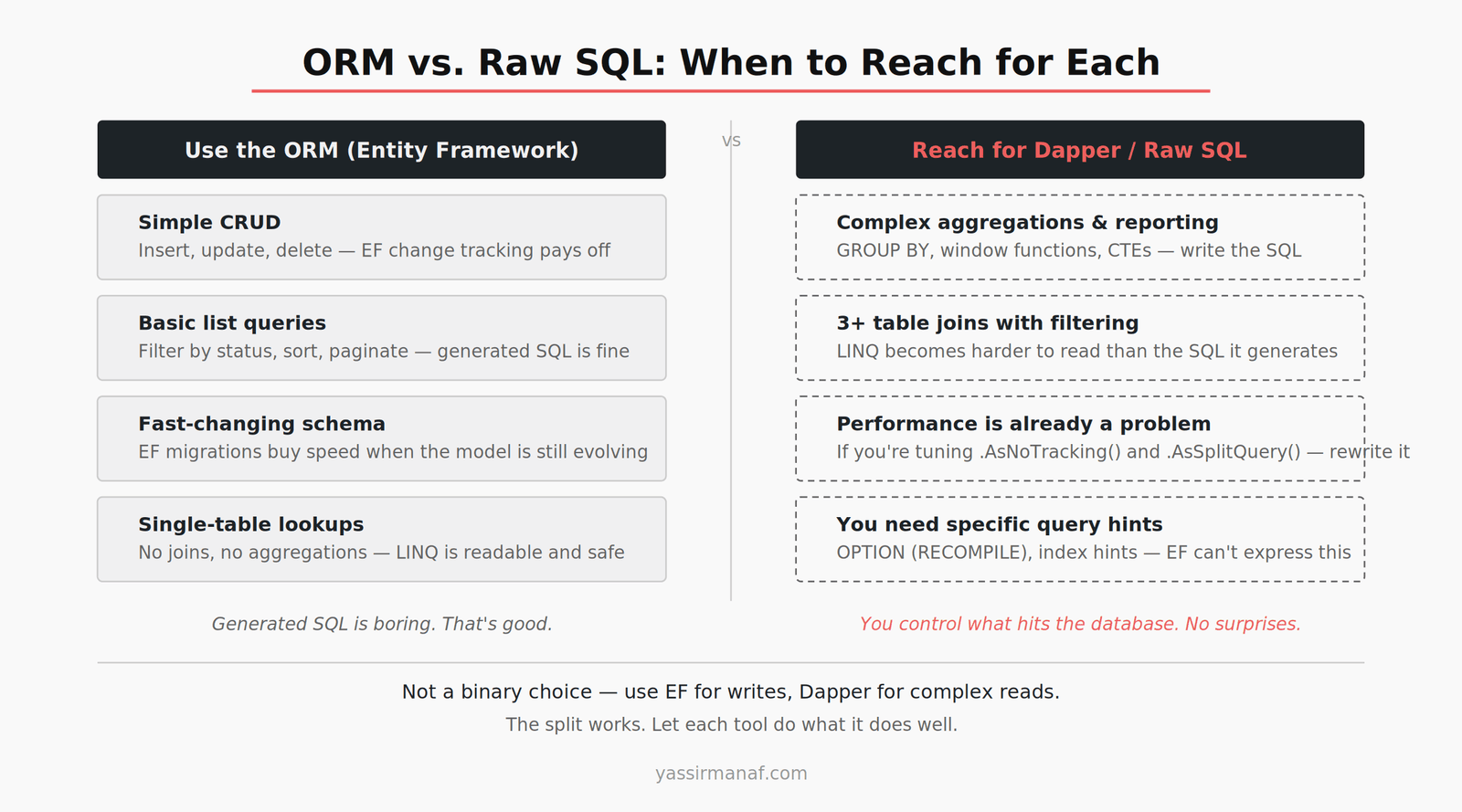
Simple CRUD. Inserts, updates, deletes — change tracking is useful here and the generated SQL is simple enough to inspect. This is where ORMs earn their keep.
Standard list queries. Filtering by a single field, sorting, paginating — EF generates reasonable SQL and the LINQ is readable. No reason to add complexity.
Early-stage development. When the schema changes every sprint and you don’t want to rewrite queries constantly, EF migrations and LINQ buy real speed. Accept the trade-off, plan to revisit specific queries as load increases.
Reach for Dapper or raw SQL when:
The query spans three or more tables. This is a heuristic, not a rule. But in my experience, once you’re joining three tables with filtering and sorting, the LINQ version is harder to reason about than the SQL — and the generated output gets unpredictable.
You need complex aggregations. Multi-level GROUP BY, window functions, CTEs — Entity Framework will either refuse or generate something you wouldn’t want to put in production. Write the SQL.
Performance is already a problem. If you’re stacking .AsNoTracking(), .AsSplitQuery(), and .Include() tuning to fix a slow query, stop. Read the generated SQL first. In my experience, the right fix is usually a rewrite, not more EF knobs.
You need query-level control. Index hints, OPTION (RECOMPILE), specific join order — EF can’t express this, and trying to work around it adds complexity without adding control.
Dapper Is the Middle Ground
If “raw SQL” sounds like going back to concatenating strings in 2004, you haven’t used Dapper. It’s a micro-ORM for .NET: you write the SQL, it maps the result set to your types. That’s the whole thing.
var orders = await connection.QueryAsync<OrderSummary>(
    @"SELECT o.Id, o.Total, o.CreatedAt, c.Name AS CustomerName
      FROM Orders o
      JOIN Customers c ON c.Id = o.CustomerId
      WHERE o.Status = @status
      ORDER BY o.CreatedAt DESC",
    new { status = "pending" }
);
No LINQ. No generated SQL. No surprise query plans. You control exactly what hits the database. And it’s still typed, still parameterized, still readable. A junior on the team who knows SQL can work with this. They can read it, explain it, debug it. That’s not always true of LINQ that’s grown organically over two years.
The split I’ve landed on: Entity Framework handles writes — inserts, updates, deletes — where change tracking is genuinely useful and queries are simple enough to inspect. Dapper handles anything complex on the read side. This keeps the codebase from becoming raw SQL strings everywhere while giving you control precisely where it matters.
The Dapper repository is maintained by Sam Saffron, co-founder of Stack Overflow. It came out of performance work on the Stack Overflow codebase — context worth keeping in mind when evaluating whether it handles production load.
What I Actually Do Now
On every .NET project, EF query logging is set up from day one. Every query EF generates gets logged in development and staging. I review new queries before they ship — not as a formal process, as a habit.
The first time a LINQ expression produces SQL that surprises me, I rewrite it. Not “add more Include calls and see if the query plan improves.” Rewrite it in SQL and use Dapper if it’s a read path.
EF migrations manage schema evolution. Every migration file is treated as a SQL script to be reviewed before it runs — not auto-applied, not merged blindly. If a migration looks wrong, it is wrong, and it needs to be corrected before it touches production.
For any query that does reporting, spans multiple tables, or is in a hot path, I write the SQL directly. I know what it does. I can read the execution plan. I can change one thing and know exactly what changed.
The practical outcome: fewer production performance incidents. When something does go wrong, debugging is faster — you know what SQL is hitting the database because you wrote it or you reviewed it. SQL skills on the team don’t atrophy because everyone’s been writing LINQ for three years and hasn’t read a query plan since onboarding.
The ORM vs raw SQL production question isn’t really about the tools. It’s about whether you know what your application is actually sending to the database. Most teams don’t, most of the time, for most queries. That works until it doesn’t. And when it stops working, the answer is almost always the same: go read the SQL.
Start on day one.
The same instinct that drives this decision — knowing what your system is actually doing versus what you’ve assumed it’s doing — applies to every architectural choice. I wrote about it in more depth in Why I Chose Simplicity Over Engineering at Banking Scale.
Have you hit the Entity Framework performance wall in production? I’d like to hear how you handled it. Find me on LinkedIn.
Leave a Reply