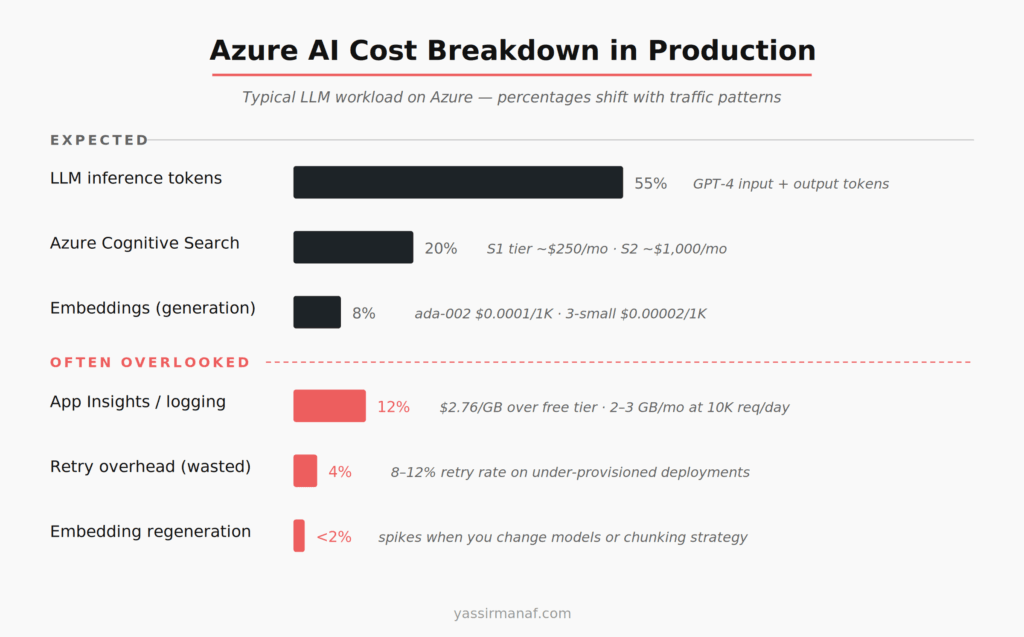
Azure AI cost optimization isn’t a pricing page exercise. Token costs are visible before you write a single line of code. What surprises teams in production is everything else: the Application Insights bill, the retry storm overhead, the Cognitive Search tier you picked at demo time and never revisited, the embedding regeneration you didn’t plan for.
I’ve run LLM workloads on Azure since early production deployments, primarily in .NET with Azure OpenAI Service. This is what the actual bill looks like once real traffic arrives.
The line items that blindside most Azure AI teams
Token costs are expected. They’re front and center in the Azure OpenAI pricing documentation. What you don’t see clearly until you’re staring at Azure Cost Management:
Application Insights telemetry. If you’re logging prompts, completions, token counts, and latency per request — which you should be — you’re ingesting a significant volume of data. A system handling 10,000 daily requests, with average prompt and completion lengths of 2,000 tokens, pushes 2–3 GB of log data per month before you’ve added exception payloads or structured traces. Application Insights charges $2.76 per GB beyond the free tier. It compounds fast when completions are long and your logging is thorough.
Retry overhead. Azure OpenAI has rate limits per deployment. If you’re using the Azure SDK in .NET without careful retry configuration, a throttled request retries with exponential backoff — and if it’s a new request payload, that retry costs tokens again. I’ve seen retry rates of 8–12% under peak load on under-provisioned deployments. That’s 8–12% of your token spend going to requests the user never saw a result for.
Cold starts on managed endpoints. If you’re using Azure Machine Learning managed online endpoints for fine-tuned models, scale-to-zero looks attractive on cost grounds. Cold starts on large models run 3–5 minutes. That’s not a caching problem. It’s an infrastructure decision you make once and live with.
Azure OpenAI vs. direct OpenAI API — what actually changes
Token pricing is identical. Azure OpenAI and the direct OpenAI API use the same underlying models at the same per-token rates. GPT-4 Turbo input runs at roughly $0.01 per 1,000 tokens. GPT-3.5 Turbo at $0.001. Same either way.
The difference is in deployment model and compliance posture. Azure OpenAI gives you data residency guarantees, private endpoints, and Azure Active Directory integration. For enterprise or regulated workloads, those features justify the added management surface. For a proof-of-concept, they add overhead without adding value.
The real cost decision is Provisioned Throughput Units (PTUs). PTUs are Azure’s reserved capacity model — you commit to a throughput tier, pay upfront, and avoid rate-limiting. At scale, PTU pricing beats consumption pricing per token. The minimum commitment starts at several thousand dollars per month. Picking PTUs too early wastes money. Picking them too late means absorbing retry overhead at exactly the moment traffic is growing fastest.
My rule: stay on consumption pricing until your monthly Azure OpenAI spend consistently exceeds $3,000–4,000. Then model whether a PTU commitment saves money at your specific traffic pattern. The math only favors PTUs with sustained, predictable load — spiky traffic usually doesn’t qualify.
Where Azure AI cost optimization fails in embedding workloads
If you’re choosing between fine-tuned models and RAG for your Azure workload, the embedding cost question matters from the start — I covered that trade-off in detail here.
Embedding costs look negligible on the pricing page. text-embedding-ada-002 runs at $0.0001 per 1,000 tokens. That’s cheap. It stops being cheap when you regenerate at scale.
The failure mode I’ve seen most: a team stores documents in Azure Blob Storage, embeds on ingest, stores vectors in Azure Cognitive Search. Then they switch embedding models — because text-embedding-3-small is more capable and cheaper at $0.00002 per 1,000 tokens — and realize they need to re-embed everything. A corpus of 500,000 chunks at 400 tokens average is 200 million tokens. At ada-002 rates, $20 to re-embed. Manageable once. Run it quarterly because your chunking strategy keeps evolving, and it’s wasted compute hours and cost you didn’t budget.
The bigger cost is Azure Cognitive Search. Vector search starts at the S1 tier, around $250 per month. For a production RAG workload with multiple indexes, filtered search, and real query volume, you’re looking at S2 or higher — $1,000+ per month. Most teams don’t see this coming because they built the demo on the free tier.
Right-size your Search tier before production. The free tier has hard limits on index size and query volume that will break under real traffic. Model your document count and queries per second before picking a tier.
Caching is the highest-ROI Azure AI cost optimization
Most LLM applications have more request repetition than engineers expect. Users ask the same questions. Pipelines run the same classification prompts on similar inputs. Report generation hits the same templates repeatedly.
Two caching layers work in production, and I’ve used both together.
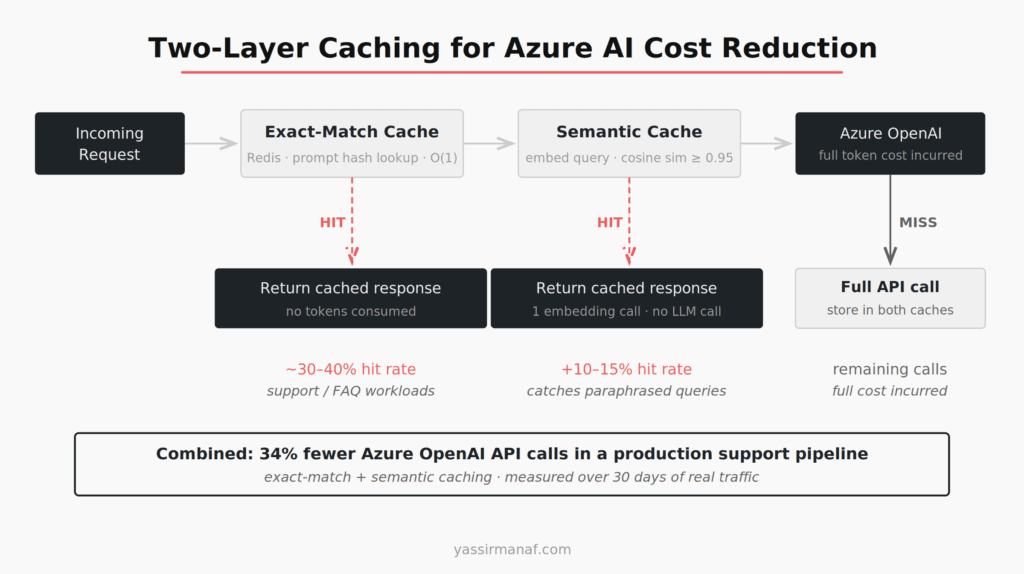
Exact-match caching. Cache the prompt hash against the completion in Redis (Azure Cache for Redis). Lookup is O(1). Hit rate depends entirely on the use case — a customer support bot might see 30–40% cache hits on common queries. A generative writing tool will see near zero. Know which one you’re building before deciding whether exact-match caching is worth the infrastructure.
Semantic caching. Embed the incoming query, run a nearest-neighbor search against cached query embeddings, and return the cached result if cosine similarity exceeds a threshold. I’ve used 0.95 as the floor — lower than that and you start returning confident wrong answers. The implementation in C# is around 40–50 lines using the Azure OpenAI embedding endpoint and a small Redis vector index. It catches paraphrased versions of the same question that exact-match misses entirely.
Semantic caching has its own cost: every uncached query runs an embedding call before hitting the LLM. At $0.00002 per 1,000 tokens for text-embedding-3-small, that’s negligible in money terms — but it adds latency. In low-latency applications, measure the round-trip before committing.
The production number from a support pipeline: exact-match plus semantic caching combined reduced Azure OpenAI API calls by 34% in the first month. That’s not a rounding error on a production bill.
If you’re thinking about how caching fits into a broader LLM architecture from first principles, this post on LLM workloads in production covers the bigger picture.
Right-sizing your model is where the real savings are
GPT-4 Turbo costs roughly 10x more per input token than GPT-3.5 Turbo, and 15x more per output token. The question is never “which model is best?” The question is “which model is sufficient for this specific task?”
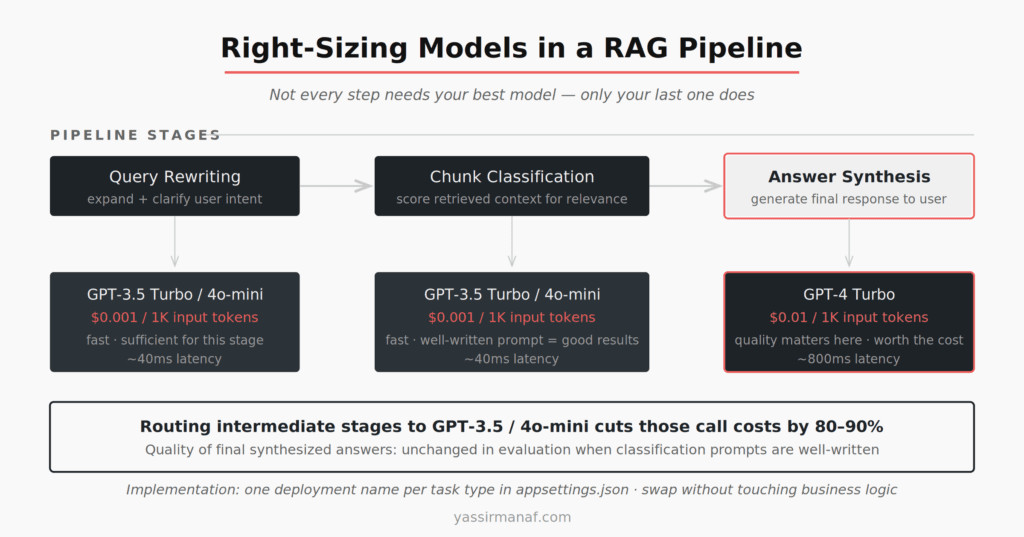
In a typical RAG pipeline, there are multiple LLM calls per user request. Query expansion or rewriting. Relevance classification of retrieved chunks. Final answer synthesis. The synthesis step probably needs GPT-4 quality. Classification almost certainly does not.
Running GPT-3.5 Turbo or gpt-4o-mini for classification and routing, and reserving GPT-4 Turbo for synthesis, cuts token spend on intermediate calls by 80–90%. The implementation in .NET is a model routing configuration in appsettings.json — one key per task type, different deployment names pointing to different models in Azure OpenAI. The cost reduction is immediate. Quality impact on final synthesized answers is undetectable in evaluation when classification prompts are well-written.
Don’t optimize for “best answer at every stage.” Optimize for “sufficient answer at this stage of the pipeline.”
Batching and async patterns that cut Azure spend
If you’re processing documents, re-ranking results, or running classification over large datasets — batch the calls. Collect inputs in chunks of 20–50, run them in parallel with Task.WhenAll in .NET, and respect your deployment’s tokens-per-minute rate limit. This eliminates per-request HTTP overhead, makes rate-limit behavior predictable, and lets you reason about token consumption per minute because you control batch size directly.
For long-running jobs — nightly report generation, document ingestion pipelines — batching has a secondary benefit: it reduces the probability of a 429 mid-run, which would otherwise trigger retries and inflate token spend unpredictably.
The math is straightforward. Processing 10,000 documents nightly, each needing one classification call, as 500 batches of 20 is more efficient than 10,000 individual calls in terms of connection overhead, retry risk, and observability. You can instrument batch progress clearly. You cannot meaningfully instrument 10,000 concurrent individual calls without adding logging overhead that itself costs money.
The Azure AI cost optimization mindset
Treat token spend like database query cost — not a fixed line item, but something you optimize continuously. Audit your top prompt templates monthly. Measure input and output token counts separately. Instrument your retry rate as a first-class metric.
Engineers who are surprised by their Azure AI bill usually moved fast on the demo, production-ized the architecture without revisiting calling patterns, and discovered six months later they’re running GPT-4 on every classification call and logging full completions to App Insights with zero sampling.
The fixes aren’t hard. They require discipline, not ingenuity. Pick the right model for the task. Cache what repeats. Sample your logs. Monitor your retry rate. Right-size your Search tier before traffic arrives.
That’s Azure AI cost optimization in production. Not theory — decisions you make once and remeasure quarterly.
Working on Azure AI costs in a .NET stack? I write about production LLM engineering from hands-on experience. Find me on LinkedIn.
Leave a Reply