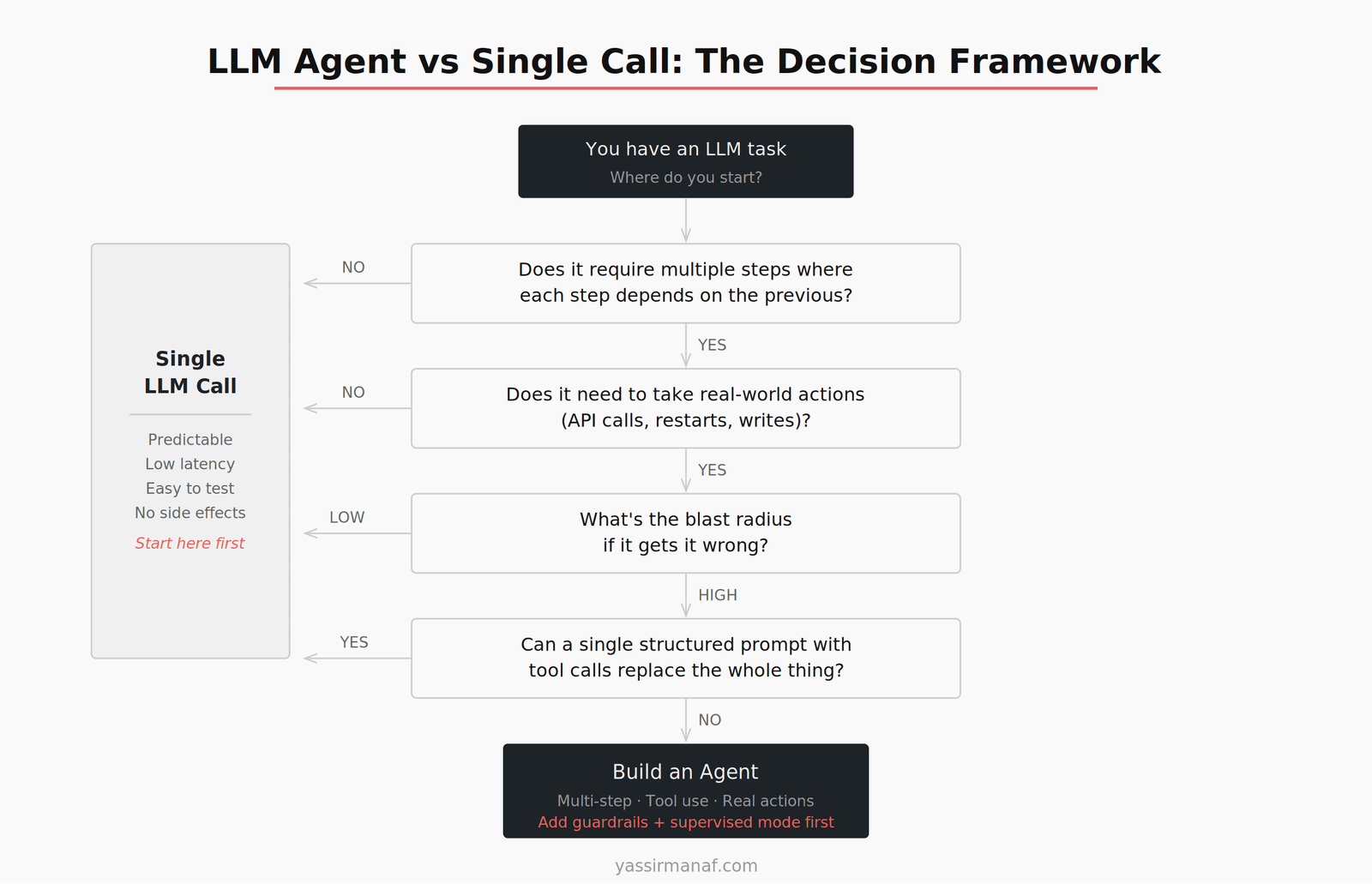
The LLM agent vs single call decision is one most teams make too late — after they’ve already started building. By then, they’re either committed to an agent that should have been a single prompt, or they’re fighting a single-call architecture that can’t do what the task actually requires. Either mistake is expensive.
I’ve been building LLM systems since before the current wave, and this is still one of the first questions I force myself to answer explicitly before touching a codebase. Not because it’s obvious — it isn’t — but because getting it wrong early compounds into real engineering debt.
This article is my decision framework. Not theory. The actual questions I ask, in order, and what each answer tells me.
Why the Default Is Usually Wrong
Most engineers default to one of two failure modes.
The first is the agent by default trap. Agents are exciting. They feel like the right tool for anything involving an LLM. You give the model tools, you let it reason, you ship something that looks like it’s thinking. Then it runs in production and you spend the next month debugging non-deterministic behavior, runaway tool calls, and failure modes that don’t exist in traditional software.
The second is the single call too long trap. You keep adding instructions to a system prompt trying to make one call handle a multi-step workflow. The prompt grows to 2,000 words. The outputs get inconsistent. You add more instructions to fix the inconsistency. It works 80% of the time and mysteriously fails the other 20%, and you can’t tell why because everything happens in one opaque pass.
Both traps have the same root cause: the architecture decision was made on instinct, not on a clear-eyed read of what the task actually requires.
The Moment I Understood the Difference
We were building an automated incident response tool. The trigger was a monitoring alert — something anomalous detected in a production system. The tool needed to fetch recent logs, analyze them to identify the pattern and probable cause, then take a remediation action: restart an instance, clear a CDN cache, scale out a service, or escalate to a human if it wasn’t confident.
The first instinct was to treat it like a traditional automation script with an LLM bolted on for the decision step. Fetch the logs in code, pass them to the LLM, ask it which action to take, then execute that action in code. Clean separation of concerns. Predictable flow. Easy to test.
We built a version of it. It worked for the simple cases. But it fell apart on anything nuanced — situations where the LLM needed to fetch a second set of logs after seeing the first, or where the right action depended on something it discovered mid-analysis that we hadn’t anticipated in our fixed flow.
The fixed pipeline was making assumptions about what the LLM would need. Every time those assumptions were wrong, we had to go back and add another step to the code. We were programming the reasoning path instead of letting the model reason.
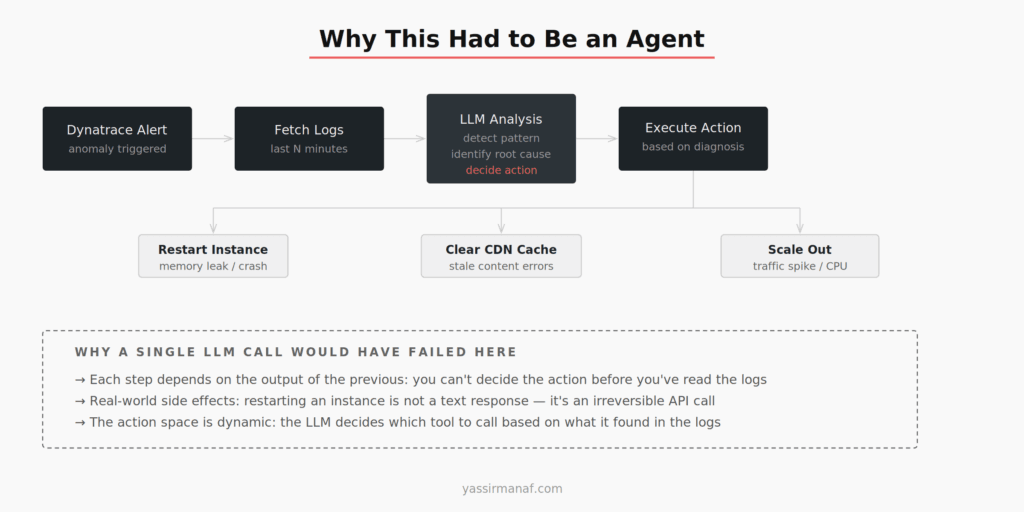
Switching to a proper agent — where the model could decide which tools to call and in what order — resolved this immediately. The model would fetch logs, find something unexpected, fetch more context, then decide on the right action. We weren’t anticipating its reasoning path in code anymore. We were giving it tools and guardrails, and letting it work.
That’s when the distinction clicked for me in a way that stuck: a single call handles reflection. An agent handles action — especially when the action space is dynamic and the steps are interdependent.
The Four Questions I Ask
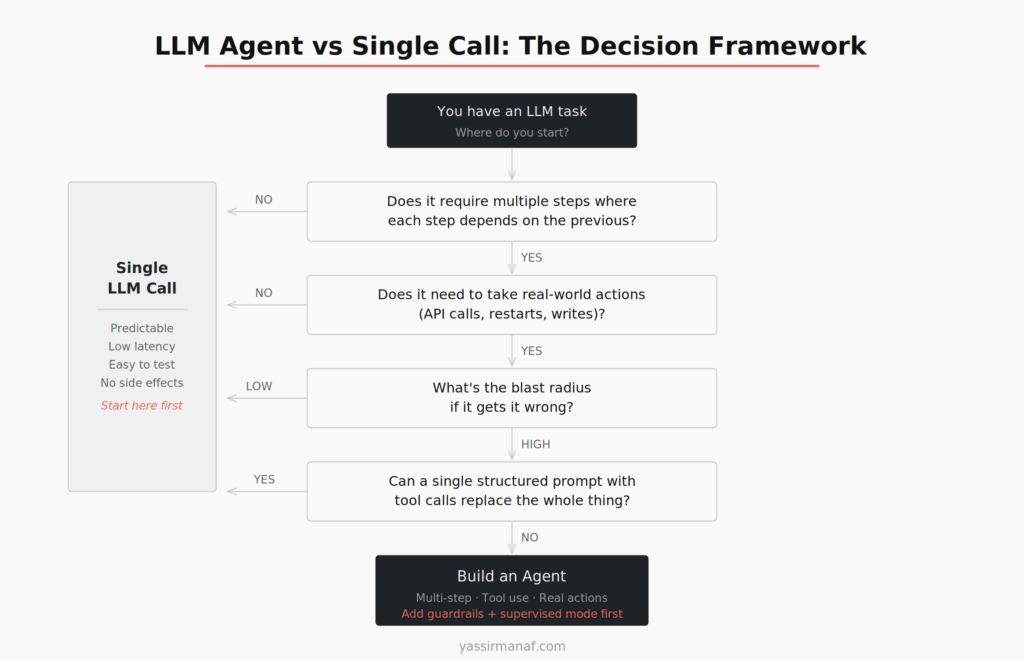
Before I write any code, I ask these four questions in order. The first NO or wrong answer sends me toward a single call. Only a YES through all four justifies an agent.
1. Does it require multiple steps where each step depends on the previous?
This is the most important question. If the task can be decomposed into a fixed sequence of operations where the output of each step is known in advance, you probably don’t need an agent. A well-structured prompt with clear instructions handles this.
If the next step depends on what the model discovers in the current step — if the reasoning path is genuinely dynamic — that’s an agent use case. The incident response tool is the clearest example: you can’t decide which logs to fetch until you’ve seen the alert details, you can’t decide the action until you’ve analyzed the logs, and sometimes the analysis surfaces something that requires fetching additional context before acting.
A single call forces you to predict the reasoning path upfront. An agent lets the model navigate it.
2. Does it need to take real-world actions with side effects?
Text summarization, classification, extraction, drafting — these are reflection tasks. The output is text. It can be wrong and you fix it. Low stakes.
Restarting a service, writing to a database, sending an email, calling a third-party API — these are action tasks. They’re irreversible or at least consequential. A wrong output isn’t just text you discard; it’s something that happened in the world.
The moment your LLM output triggers a real-world action, you’re in agent territory. Not necessarily because you need multi-step reasoning, but because the consequences of failure are different. You need tool boundaries, guardrails, and ideally a human-in-the-loop for high-blast-radius actions — none of which exist in a simple call-and-response pattern.
3. What’s the blast radius if it gets it wrong?
This question determines how much overhead your agent needs, not whether to build one.
Low blast radius — incorrect text output, wrong classification, bad draft — you can ship with minimal guardrails and fix errors in review. The cost of a mistake is a correction.
High blast radius — production changes, financial transactions, customer-facing communications sent automatically — you need supervised mode first. Build the agent, but route high-consequence actions through a human approval step until you have enough production data to trust the model’s judgment. We did exactly this with the incident response tool: it ran for weeks suggesting actions rather than executing them, while we validated its reasoning against what we would have done manually. Only after that did we enable autonomous execution.
This is the step most teams skip. They build an agent, test it in staging, and ship it to prod with full autonomy. Then something goes wrong at 2am that would never have happened in a test environment.
4. Can a single structured prompt with tool calls replace the whole thing?
This is the check before you commit. Even if the previous three answers point toward an agent, ask whether a single call with well-defined tool calls covers the full task.
A lot of what looks like multi-step agent work is actually a single call problem with a richer output schema. If the model can receive all the relevant context in one prompt, reason over it, and return a structured output that includes which action to take — and if that action space is fixed and known — you might not need a full agent loop.
The difference: an agent can call tools, observe results, and decide to call more tools. A single call with tool definitions can call tools in one pass, but can’t react to what those tools return. If your task needs that reaction loop, you need an agent. If it doesn’t, a single structured call is simpler, faster, cheaper, and easier to test.
When Single Calls Win
Single calls are underrated. They handle a large share of real LLM workloads cleanly:
Classification and routing. Given this support ticket, which team should handle it? Given this log entry, is it an error, a warning, or noise? Single call, structured output, done.
Extraction and transformation. Pull the key fields from this unstructured document. Convert this free-text address into a structured format. Single call every time.
Generation with fixed context. Write a summary of this document. Draft a response to this customer email given our policy. The context is known, the output is text, there are no side effects.
Analysis with a known scope. Analyze this code diff and identify potential issues. Review this SQL query for performance problems. Everything the model needs is in the prompt, the output is a report, no tools required.
The common thread: the reasoning path is predictable, the context is complete, and the output doesn’t trigger anything in the world. If your task fits this description, start with a single call. Add structure with well-designed RAG pipelines if you need to bring in external context. Reach for an agent only when the task genuinely outgrows this pattern.
When Agents Win
Agents are the right tool when three things are true simultaneously: the task is multi-step, the steps are interdependent, and the outcome has real-world consequences.
The incident response system is the clearest example I have. But the pattern generalizes:
Autonomous research tasks. An agent that receives a question, decides which sources to query, synthesizes results, decides if it needs more information, and produces a final answer. The path from question to answer isn’t fixed — it depends on what the agent finds.
Workflow automation with branching. Processing a document that might need different handling depending on its content. Not a fixed switch-case you program upfront — the model decides the branch based on what it reads.
Tool-augmented reasoning over live data. Any task where the model needs to pull data, reason about it, potentially pull more data based on what it finds, and then act. This is fundamentally different from RAG, which retrieves context once before a single generation step.
The signal in all of these: the model needs to observe, decide, act, observe again. That loop is the definition of an agent. If your task doesn’t have that loop, you probably don’t need one.
The Practical Default
Start with a single call. Always. Not because agents are bad, but because single calls are easier to test, cheaper to run, faster to iterate on, and much easier to debug when something goes wrong.
If the single call approach starts showing its limits — you’re cramming too much into the prompt, the outputs are inconsistent because the context is too variable, or the task genuinely needs to react to intermediate results — then you have real evidence that an agent is warranted. Build it then, with that evidence.
The same instinct I wrote about in choosing simplicity over engineering applies here: don’t reach for the more powerful tool until you’ve confirmed the simpler one can’t do the job. Agents are powerful. They’re also operationally expensive, harder to debug, and non-deterministic in ways that will surprise you in production.
Use the framework. Answer the four questions. The architecture usually tells you what it needs to be — if you ask before you start building.
Building LLM systems and wrestling with this decision? I’d like to hear what pushed you toward an agent when you thought you needed one, or the other way around. Find me on LinkedIn.
Leave a Reply