The .NET solution structure you choose on day one doesn’t matter much on day one. It starts mattering around month six, when the codebase has grown, three engineers are working in it simultaneously, and every new feature requires touching five unrelated projects. By year two, a poorly structured solution is load-bearing debt — too expensive to fix, too painful to leave.
I’ve inherited badly structured solutions. I’ve also made poor structure decisions and had to live with them. This is what I’ve settled on after years of production .NET work. Not a tutorial. Not a boilerplate. A set of decisions I enforce consistently, and the reasoning behind each one.
Why .NET Solutions Become Unmaintainable
It rarely happens because of bad intentions. It happens because structure decisions get deferred.
You start with one project. You grow it organically. At some point you realize the architecture exists only in people’s heads — nothing enforces the boundaries. A developer can, and eventually will, reference anything from anywhere. The implicit rules don’t survive team turnover.
The second cause: structure decisions get cargo-culted from the wrong source. Someone read a post about Clean Architecture, added four projects to the solution, and called it done. The layers are there. But the dependency rules aren’t enforced, the naming is inconsistent, and nothing prevents Domain from importing an infrastructure utility two months in when someone needed something quickly.
Structure without enforcement is just decoration.
The Layer Separation I Use on Every .NET Project
Every production .NET solution I build uses the same four-layer structure. Not because it’s the only valid approach, but because consistency has compounding value. I can navigate any of my projects without relearning the layout.
The layers:
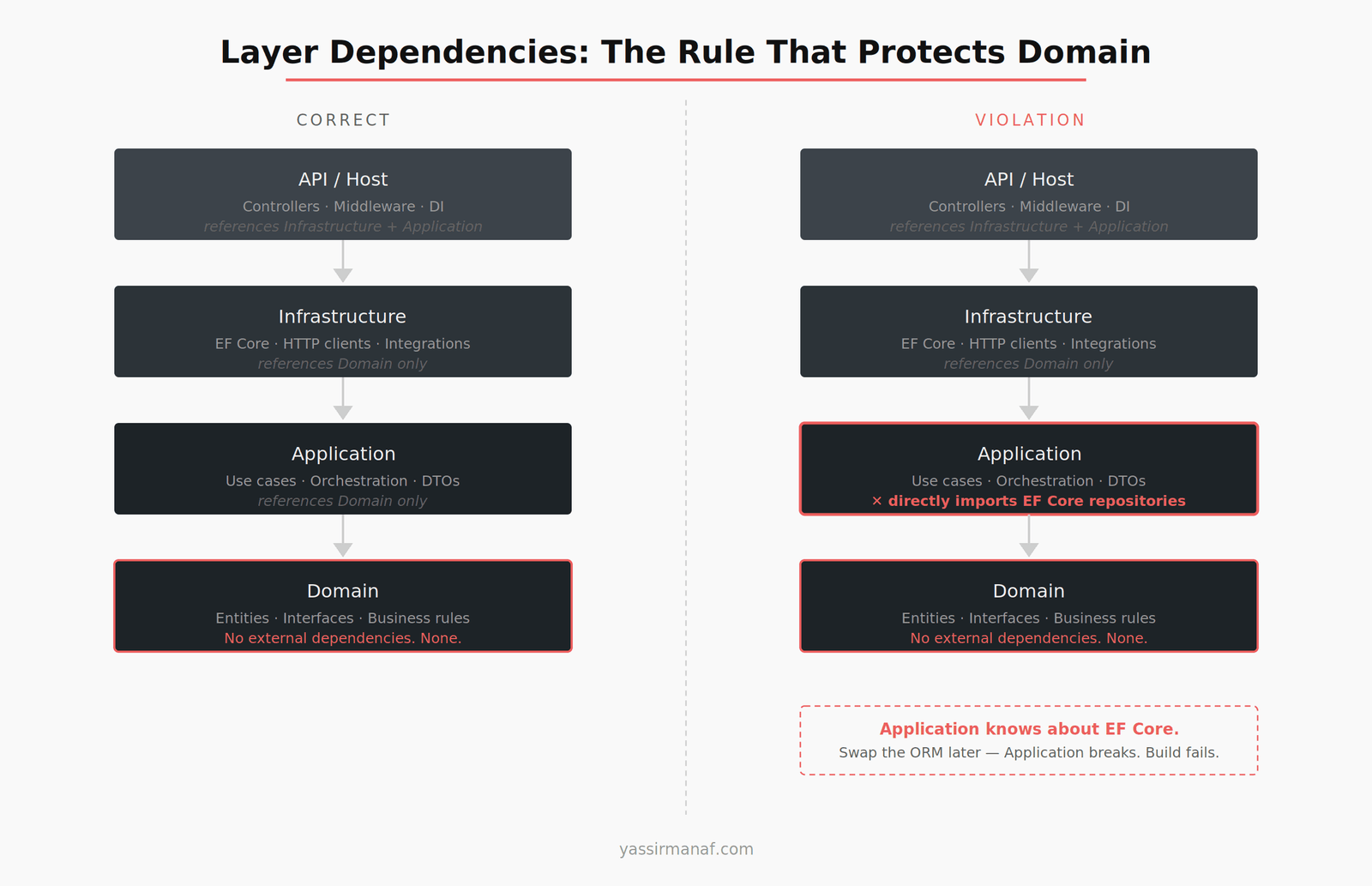
- Domain — business entities, domain logic, interfaces. Zero external dependencies.
- Application — use cases, orchestration, DTOs. References Domain only.
- Infrastructure — EF Core, HTTP clients, file system, third-party integrations. Implements interfaces defined in Domain.
- API / Host — controllers or minimal API endpoints, middleware, DI registration. Thin as possible.
The constraint that matters: Domain has no outward dependencies. None. This protects business logic from coupling to frameworks, ORMs, or delivery mechanisms. It’s also the constraint developers violate first under time pressure, which is why it has to be enforced at the build level — not just documented.
Each layer is a separate C# project with its own .csproj — not a folder inside one project. The reason is simple: <ProjectReference> entries in .csproj files are auditable and enforced at compile time. If Application accidentally references Infrastructure, the build fails. You can’t enforce folder-based separation at compile time. Separate projects give you that constraint for free.
How I Name Projects in a .NET Solution
Naming conventions sound like a minor preference. They become important when the solution has twelve projects and you need to find something fast under pressure.
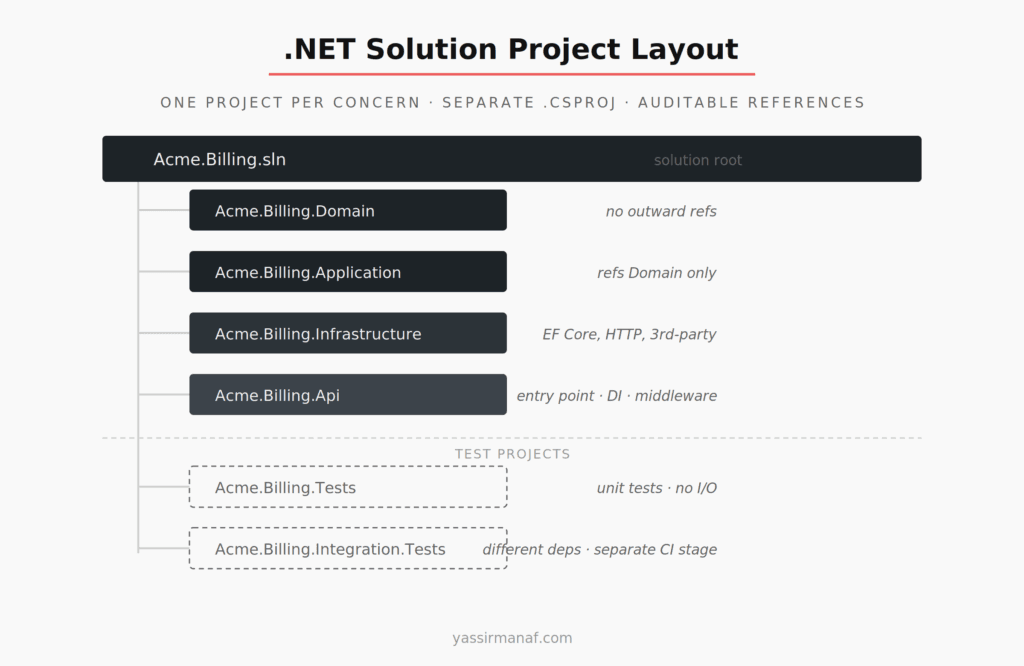
The pattern I use: [Product].[Bounded Context].[Layer]
Examples for a billing subdomain:
Acme.Billing.DomainAcme.Billing.ApplicationAcme.Billing.InfrastructureAcme.Billing.ApiAcme.Billing.TestsAcme.Billing.Integration.Tests
Unit tests and integration tests are separate projects. Not separate folders inside the same project — separate projects with separate .csproj files. They have different dependencies, different runtime requirements, and different CI pipeline behaviors. Combining them forces you to manage conflicting constraints. Splitting them costs one extra project reference.
The folder structure on disk matches the project names exactly. No creative nesting. No folders that don’t map to namespaces. A developer who opens the solution for the first time should be able to tell where everything lives before opening a single file.
Enforcing Dependency Direction With Code
Naming and separating projects is not enough if the dependency rules aren’t enforced. Enforcement is what separates structure from structure-shaped decoration.
The first enforcement layer: <ProjectReference> restrictions in .csproj. Application doesn’t reference Infrastructure. Infrastructure doesn’t reference Application. Domain references nothing in the solution. These restrictions are set once and maintained by the build system.
The second layer: architecture tests using NetArchTest. These are unit tests that assert dependency rules as part of the normal test suite:
[Fact]
public void Domain_Should_Not_Reference_Infrastructure()
{
    var result = Types.InAssembly(typeof(SomeDomainEntity).Assembly)
        .ShouldNot()
        .HaveDependencyOn("Acme.Billing.Infrastructure")
        .GetResult();

    Assert.True(result.IsSuccessful);
}
These tests run in CI. If anyone adds a reference that violates the layering rules, the build fails with a message that explains exactly what’s wrong. No code review required to catch it. The architecture enforces itself.
This matters more as teams grow. A solo developer holds the rules in memory. A team of five cannot. The rules need to live in code, not in a wiki.
Where Cross-Cutting Concerns Actually Go
Logging, validation, error handling, feature flags — every project needs them, and none belong cleanly to one layer. This is where solutions get cluttered fast.
My approach: a single Shared project, used sparingly. It contains things that are truly cross-cutting with no business logic attached: base exception types, generic result wrappers, extension methods, constants. It does not contain anything domain-specific.
The test I apply to anything before putting it in Shared: if this class mentions a domain concept, it’s in the wrong project. Shared should be theoretically replaceable with a NuGet package without breaking any business logic. If that’s not true, something domain-specific has leaked in.
Logging specifically gets handled through abstraction. Application references ILogger<T> from Microsoft.Extensions.Logging.Abstractions — just the interface. No Serilog, no NLog, no concrete framework in Application or Domain. Infrastructure registers the concrete logger implementation in the DI container. This keeps Application testable without mocking a logging framework and means you can swap Serilog for anything else without touching a line of business logic.
Feature-First Folder Organization Inside a Layer
Within a layer, I organize by feature — not by type.
The instinct, especially early in a project, is to group by type: all controllers in a Controllers folder, all services in a Services folder, all validators in a Validators folder. This feels organized. It becomes painful when you’re working on a specific feature and need to open files spread across six directories for every change.
Feature-first means grouping by ownership instead: Billing/, Reporting/, UserManagement/. Each folder contains the controller, service, validator, commands, and queries specific to that feature. Related files live together.
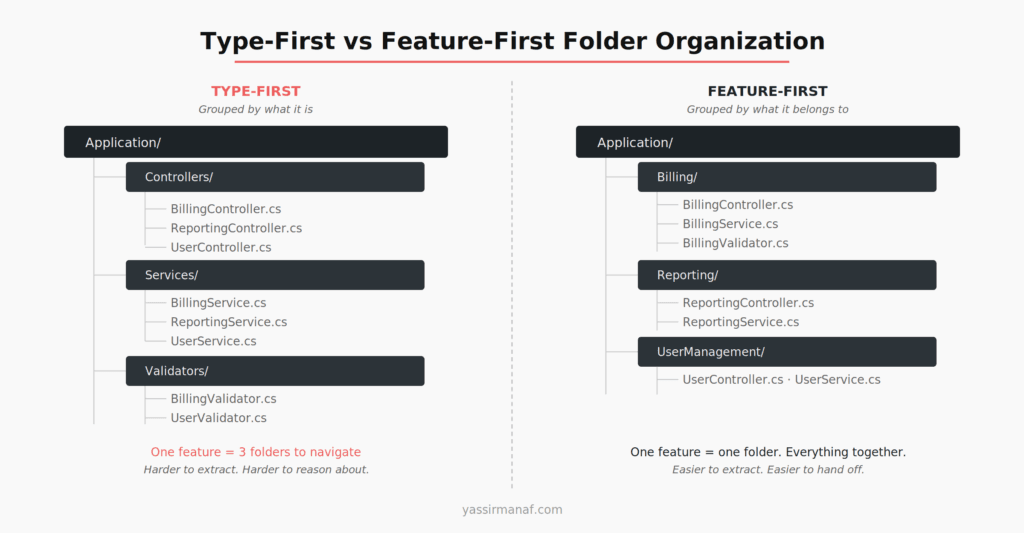
The tradeoff: some structural duplication. Two features might each have a Validators subfolder. That’s fine. The cost of that duplication is zero compared to the cost of navigating across type-based folders on every change.
Feature-first also makes extraction easier. If a feature eventually needs to become a separate service — or be handed to a different team — the files are already co-located. Extraction becomes a structural move. With type-first organization, it’s an archaeological dig.
The .NET Solution Structure Decisions I’ve Stopped Making
Shared kernel projects that grow without a constraint. I’ve seen a Core or SharedKernel project that ends up containing half the domain model because it was convenient. Every project references it. It becomes a grab-bag with no clear ownership and no way to enforce what belongs there. I use Shared only for the cross-cutting concerns described above.
Tests inside production code projects. A historical .NET pattern that should stay historical. Tests get their own projects. Non-negotiable.
Feature flags and environment configuration in Domain. If a domain rule changes based on a feature flag, that conditional lives in Application — not in a configuration dependency inside Domain. Domain should not know what environment it’s running in.
Database migrations in the same project as application code. Migrations need their own project and their own deployment lifecycle. When they live alongside application code, they get treated as an afterthought and deployed as part of the application release. A migration that runs at the wrong time, on the wrong schema version, becomes an incident at 2am. Separate the concern.
For event-driven communication between modules, the same layering principles apply — define integration event contracts in a project with no external framework dependencies, handle transport in Infrastructure. I’ve written about how message queues behave under production conditions if that context is useful alongside these structure decisions.
A .NET Solution Structure That Survives the Second Year
A solution structure is a communication tool. It tells the next developer — or the future version of you — where things live and why they’re there. A good structure is self-documenting. A bad one requires a wiki page and a thirty-minute onboarding call to explain what lives where.
The decisions above aren’t complicated. They don’t require a new framework or a vendor tool. They require consistency and the discipline to hold the rules before deadline pressure makes “just add it here” feel reasonable.
The solutions I’m most satisfied with aren’t the most sophisticated. They’re the ones where a new developer can open the solution, navigate to any feature, trace a request from entry to exit, and understand the codebase without asking anyone for help. That’s what good .NET solution structure buys you. Not a cleaner repo. A team that moves faster in month twelve than they did in month three.
What structure decision have you had to undo mid-project? Find me on LinkedIn.
Leave a Reply